Settings & Routing
The default iD2 settings are suitable for initial recording and monitoring. Open Settings to adjust monitor behaviour, Talkback, digital I/O or device options; use Routing when you need a different source to feed a physical output.
Use Monitor Settings to set the Dim Amount, Reference Level, Volume Recall, Talkback source, Mono Mode and FN assignment.
Use Device Settings for Digital Mode, Clock Source and Preamp Trim. Global Mute also has a scope setting: choose Speaker Outputs to mute speakers only, or All Outputs to mute both speakers and headphones.
Talkback Settings
Talkback uses an input from the connected iD2.
Choose the iD2 input channel you want to use as the Talkback source.
A Talkback icon appears at the top of the selected input's Mixer channel strip, identifying the input assigned to Talkback.

By default, no Talkback source is selected.
Routing
Open Routing when you need to send a particular mix or computer-playback source to a physical output. The output destinations are shown as stereo pairs by default; switch to Mono view to assign the left and right channels separately.
Choose from Main Mix, the Independent Mixes or three stereo pairs of Virtual Thru channels. Main Mix appears as separate Main and ALT routing sources, both fed from the same Main Monitor Mix.
The analogue destinations are Main Outputs 1–2, ALT Outputs 3–4 and HP1 on Outputs 5–6.
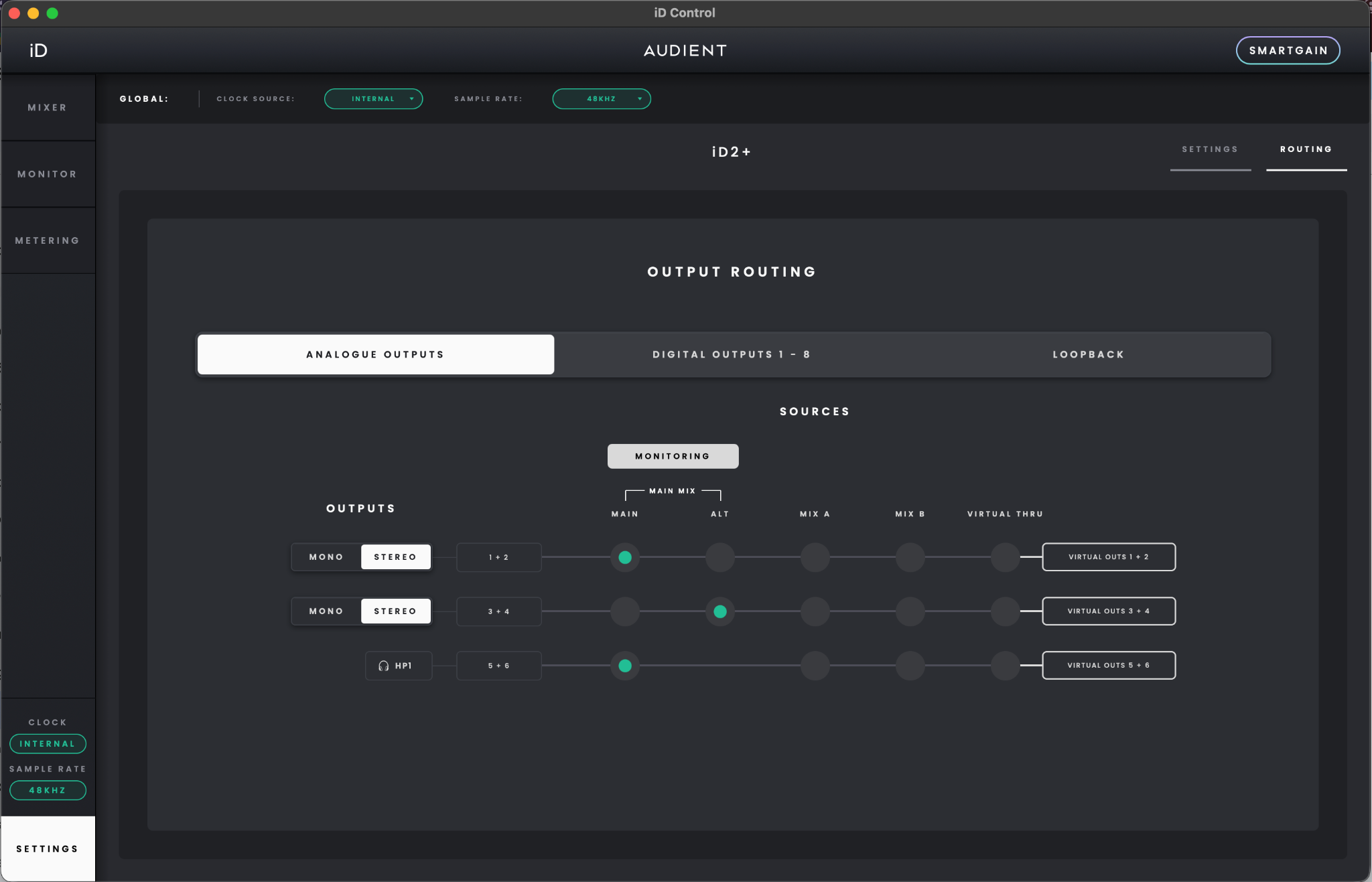
For normal use, no routing changes are needed: Main feeds Outputs 1–2, ALT feeds Outputs 3–4 and Main Mix feeds HP1 on Outputs 5–6 by default.
Use Virtual Thru when you want a stereo computer signal to reach an output directly without passing through the iD Control Mixer.
Assigning a Virtual Thru source to an output displays a warning that the signal could be loud. Select Continue to apply the routing change, or Cancel to leave it unchanged.
When you assign the Main routing source to ALT Outputs 3–4 while RoomTune correction profiles are configured, iD Control warns that both monitor pairs will use that source's Monitor Correction Profile. Select Continue to apply the change, or Cancel to keep the existing routing.
Please note: When digital outputs are set to S/PDIF Mode, routing a Main Mix Source to the digital outputs is not supported.